
操作环境
- 硬件:华为云服务器
- 操作系统:Rocky Linux 9.0 64bit
- 服务器软件:nginx 1.24.0,php 8.2.6,openssl 3.0.7,WordPress6.2.2
基本假设
1.nginx已开启https服务
2.nginx已配置http转发https
3.nginx已配置gzip模块
操作方法
1.修改nginx.conf文件,修改 HTTPS 部分内容。
在 HTTPS的server块添加以下内容,并保存修改:
# BEGIN Browser Cache
    gzip on;
    gzip_types text/css text/x-component application/x-javascript application/javascript text/javascript text/x-js text/richtext text/plain text/xsd text/xsl text/xml image/bmp application/java application/msword application/vnd.ms-fontobject application/x-msdownload image/x-icon application/json application/vnd.ms-access video/webm application/vnd.ms-project application/x-font-otf application/vnd.ms-opentype application/vnd.oasis.opendocument.database application/vnd.oasis.opendocument.chart application/vnd.oasis.opendocument.formula application/vnd.oasis.opendocument.graphics application/vnd.oasis.opendocument.spreadsheet application/vnd.oasis.opendocument.text audio/ogg application/pdf application/vnd.ms-powerpoint image/svg+xml application/x-shockwave-flash image/tiff application/x-font-ttf audio/wav application/vnd.ms-write application/font-woff application/font-woff2 application/vnd.ms-excel;
    location ~ \.(css|htc|less|js|js2|js3|js4)$ {
        expires 31536000s;
        etag on;
        if_modified_since exact;
        try_files $uri $uri/ /index.php?$args;
    }
    location ~ \.(html|htm|rtf|rtx|txt|xsd|xsl|xml)$ {
        etag on;
        if_modified_since exact;
        try_files $uri $uri/ /index.php?$args;
    }
    location ~ \.(asf|asx|wax|wmv|wmx|avi|avif|avifs|bmp|class|divx|doc|docx|exe|gif|gz|gzip|ico|jpg|jpeg|jpe|webp|json|mdb|mid|midi|mov|qt|mp3|m4a|mp4|m4v|mpeg|mpg|mpe|webm|mpp|_otf|odb|odc|odf|odg|odp|ods|odt|ogg|ogv|pdf|png|pot|pps|ppt|pptx|ra|ram|svg|svgz|swf|tar|tif|tiff|_ttf|wav|wma|wri|xla|xls|xlsx|xlt|xlw|zip)$ {
        expires 31536000s;
        etag on;
        if_modified_since exact;
        try_files $uri $uri/ /index.php?$args;
    }
    add_header Referrer-Policy "no-referrer-when-downgrade";
# END Browser Cache
2.重新启动nginx服务
用命令 systemctl restart nginx重启nginx服务,再使用命令 systemctl status nginx查看nginx服务状态。
[root@hecs-288529 ~]# systemctl restart  nginx
[root@hecs-288529 ~]# systemctl status  nginx
● nginx.service - nginx
     Loaded: loaded (/usr/lib/systemd/system/nginx.service; enabled; preset: disabled)
    Drop-In: /usr/lib/systemd/system/nginx.service.d
             └─php-fpm.conf
     Active: active (running) since Thu 2023-06-01 09:58:24 CST; 2s ago
    Process: 5796 ExecStart=/usr/local/nginx/sbin/nginx (code=exited, status=0/SUCCESS)
   Main PID: 5797 (nginx)
      Tasks: 3 (limit: 23205)
     Memory: 3.3M
        CPU: 12ms
     CGroup: /system.slice/nginx.service
             ├─5797 "nginx: master process /usr/local/nginx/sbin/nginx"
             ├─5798 "nginx: worker process"
             └─5799 "nginx: worker process"

Jun 01 09:58:24 hecs-288529 systemd[1]: Starting nginx...
Jun 01 09:58:24 hecs-288529 systemd[1]: Started nginx.
3.浏览网站测试
发现网页访问秒开,但是网页有部分图片无法显示。
打开EDGE浏览器的开发人员工具(其它浏览器也有类似工具),发现有部分图片资源请求的回应是404。
查看nginx的错误日志,发现有大量 No such file or directory的错误记录,正是回应404的部分图片资源请求。摘录其中一条错误日志如下:
2023/06/03 11:00:43 [error] 21996#0: *55 open() "/usr/local/nginx/html/wp-content/uploads/2023/05/Pasted-image-20230307220546-1536x864.png" failed (2: No such file or directory), client: 36.157.185.137, server: wslibai.com, request: "GET /wp-content/uploads/2023/05/Pasted-image-20230307220546-1536x864.png HTTP/2.0", host: "wslibai.com", referrer: "https://wslibai.com/technology/visual-studio-code-%e5%bc%80%e5%8f%91c-c%e7%8e%af%e5%a2%83%e6%90%ad%e5%bb%ba/"
经核实是请求资源的路径错误,原来是我的wordpress网站根目录已设置为html/wordpress,而上述新添加的location块中未配置root参数。
4.添加根目录参数设置
在以上新添加的几个location块中添加一行内容: root html/wordpress;,保存修改,重新启动nginx服务,问题解决。
location ~ \.(css|htc|less|js|js2|js3|js4)$ {
            root   html/wordpress;
            add_header    Cache-Control  max-age=360000;
            #expires 31536000s;
            etag on;
            if_modified_since exact;
            try_files $uri $uri/ /index.php?$args;
        }
        location ~ \.(html|htm|rtf|rtx|txt|xsd|xsl|xml)$ {
            root   html/wordpress;
            add_header    Cache-Control  max-age=no-cache;
            etag on;
            if_modified_since exact;
            try_files $uri $uri/ /index.php?$args;
        }
        location ~ \.(asf|asx|wax|wmv|wmx|avi|avif|avifs|bmp|class|divx|doc|docx|exe|gif|gz|gzip|ico|jpg|jpeg|jpe|webp|json|mdb|mid|midi|mov|qt|mp3|m4a|mp4|m4v|mpeg|mpg|mpe|webm|mpp|_otf|odb|odc|odf|odg|odp|ods|odt|ogg|ogv|pdf|png|pot|pps|ppt|pptx|ra|ram|svg|svgz|swf|tar|tif|tiff|_ttf|wav|wma|wri|xla|xls|xlsx|xlt|xlw|zip)$ {
            root   html/wordpress;
            add_header    Cache-Control  max-age=360000;
            #expires 31536000s;
            etag on;
            if_modified_since exact;
            try_files $uri $uri/ /index.php?$args;
        }
        add_header Referrer-Policy "no-referrer-when-downgrade";
细心的读者可能发现了
expires参数已被替换为Cache-Control,其实两个参数功能差不多,都是表示强缓存,但前者是http 1.0,后者是http1.1的,后者功能更强。如果两个参数都配置,起作用的是后者。具体含义可自行百度。同时,我将过期时间从原来的4个月修改为4天了(开发调试期间,设短一点)。
5.打开开发人员工具浏览网站测试验证
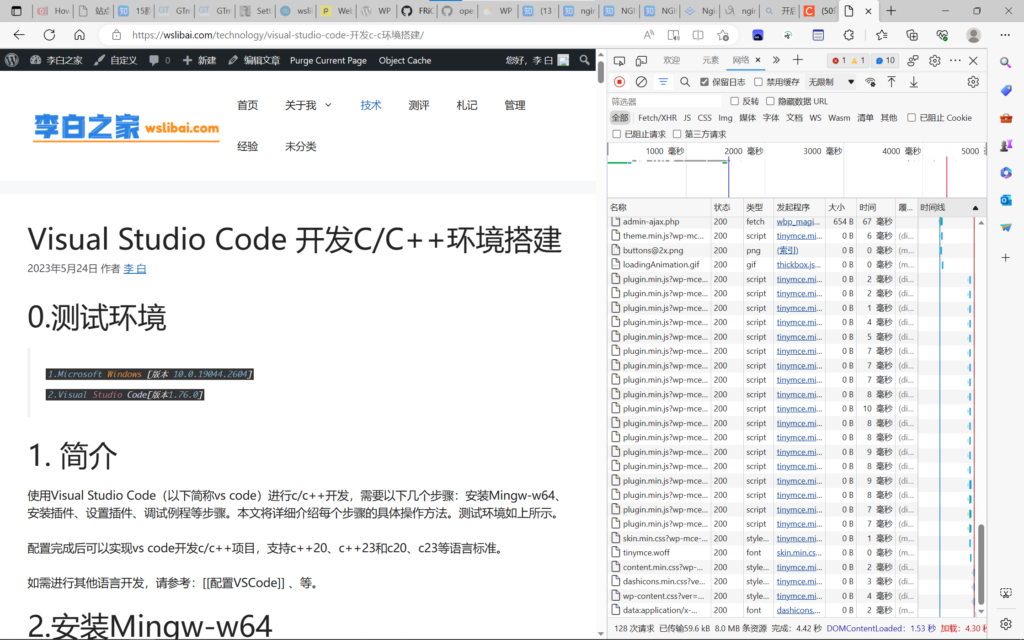
用EDGE浏览器打开网站页面,并打开开发人员工具,刷新页面,发现总请求128次,通过网络传输大小为59.6kB,资源实际大小为8MB。说明浏览器缓存已启用。







This is a demo advert, you can use simple text, HTML image or any Ad Service JavaScript code. If you're inserting HTML or JS code make sure editor is switched to 'Text' mode.